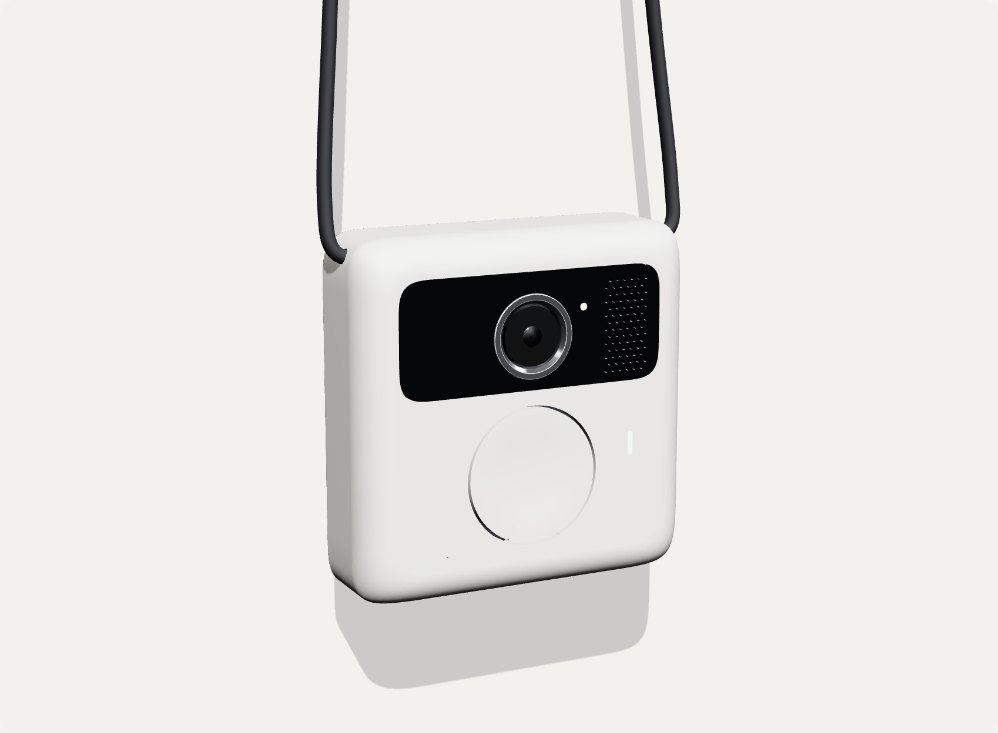
LOCI Companion is a personal AI assistant with a memory for what you have seen. It is a small camera worn on the chest that remembers what it saw, where and when, so you can ask about it later: where did I leave my keys, what was on that whiteboard, what was the name of the wine at dinner. I have a working demo on my desk. This series is me building the rest of it in public.
This is Part 1 of Building LOCI Companion. It covers the idea, the hardware I am using today and where the project stands. It also opens up the architecture and LOCI-DB, the memory underneath, with diagrams and code you can run. Later parts go deeper into the firmware, battery life and the first people to wear it.
See it work
Before the idea and the architecture, here is the current prototype doing the one thing it exists to do. It is twenty-two seconds, unedited, filmed on my desk.
Me, holding the button: Where is the refrigerator?
LOCI Companion: Your refrigerator was last seen on the right, in the middle area. That was one day ago, at 4:57 PM. That was before I restarted. It’s to the right of the remote.
That answer is short, but almost every part of the system is in it. This is what happens between the question and the reply:
- A day earlier, it saw the refrigerator. While it ran, the board sent a camera frame to the host about twice a second. The detector found a refrigerator and a remote, and each sighting was stored in LOCI-DB as a memory: what it was, where in view it sat, and exactly when.
- Then it was switched off. The host process restarted. The memory did not disappear: the assistant saves what it has seen to disk and reloads it on start. The phrase “That was before I restarted” is the assistant being honest that this memory comes from a previous session, not from what it can see right now.
- I press the button and ask. The board records my voice and sends the audio to the host, where a local speech model (faster-whisper) turns it into text. Nothing goes to a cloud service.
- The question becomes a memory lookup, not a guess. “Refrigerator” is matched to the label the detector uses, and LOCI-DB returns the most recent sightings of it, newest first, with their position and timestamp.
- The answer is built from facts. The position becomes words (“on the right, in the middle area”), the timestamp becomes “one day ago, at 4:57 PM”, and the nearest other object remembered at the time becomes a landmark: “to the right of the remote”. No language model is asked to invent the answer; every phrase traces back to a stored observation.
- It speaks. The host turns the sentence into audio and the board plays it from its speaker. In this take the answer starts about three and a half seconds after I stop talking, slower than the 1.3 seconds I have measured at best. Closing that gap is on the list.
Two honest caveats. “On the right, in the middle area” describes where the refrigerator was in the camera’s view, not in the room: the pendant has no depth sensor, so it cannot yet say “in the kitchen, by the window”. The first prototype, with its depth camera, could; more on that below. And the detector only knows about eighty common object types, so it can find a refrigerator or a cup today, but not your keys. Both are solvable, and both are later parts of this series.
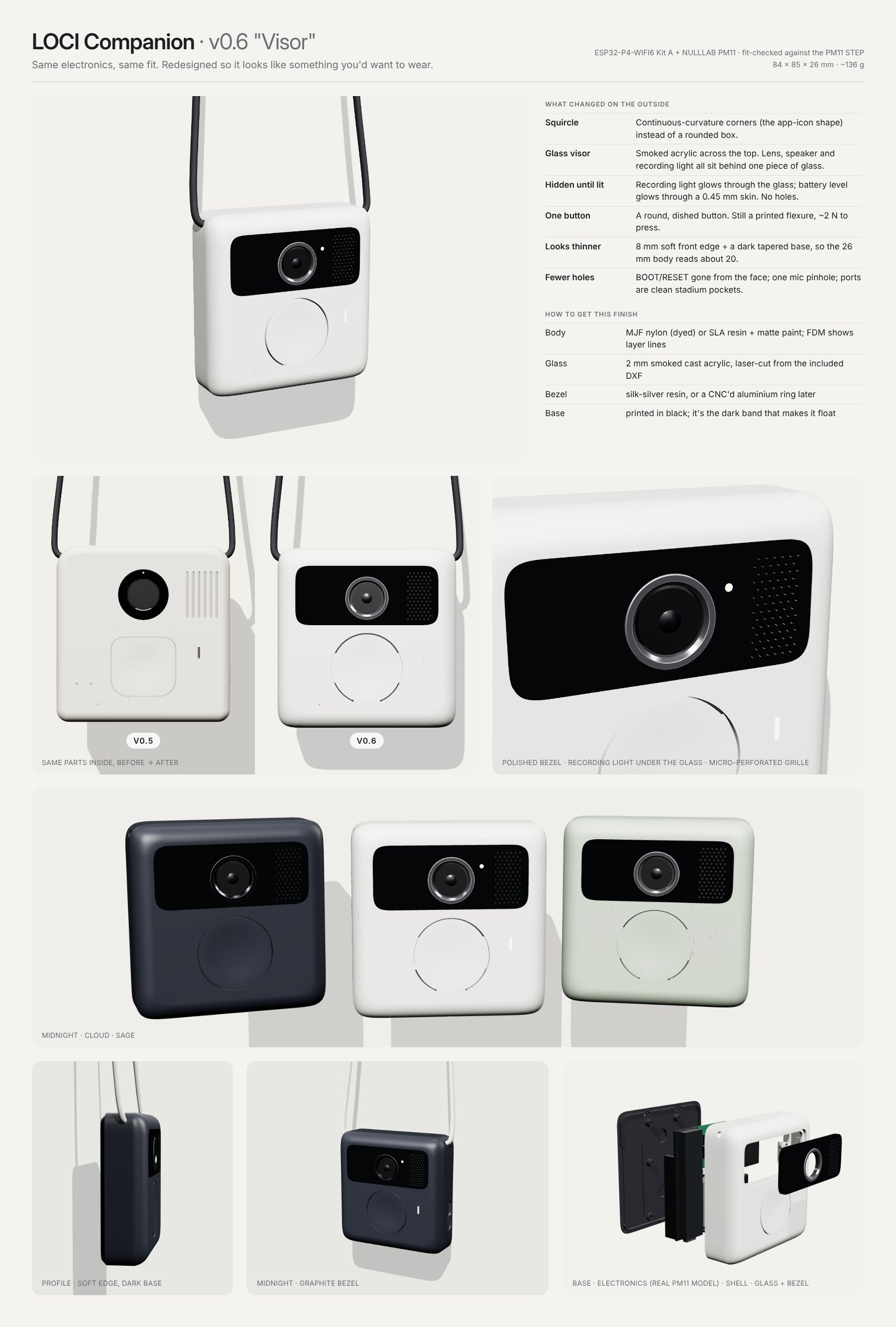
Where this is going: v0.6 “Visor”
What you just watched is a development board on a desk. This is what I am designing it to become: the same electronics and the same fit, redesigned so it looks like something you would actually want to wear. These are renders, not photos. The enclosure has been fit-checked against the CAD model of the battery module, but it has not been printed yet.

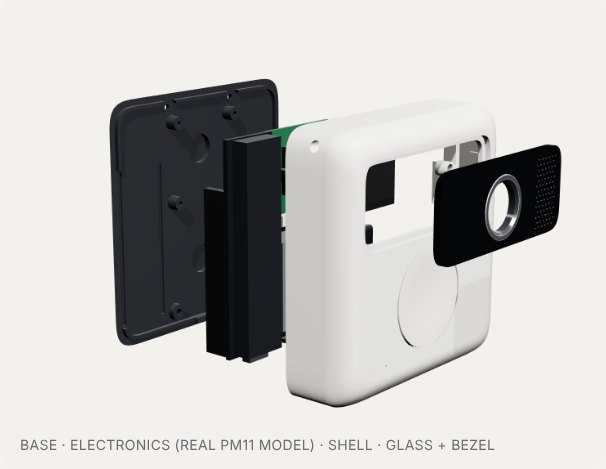
Inside it is exactly what is on my desk today: the Waveshare ESP32-P4 board, its camera and speaker, and the NULLLAB PM11 battery module. Everything that changed is on the outside, and every change is there for a reason.
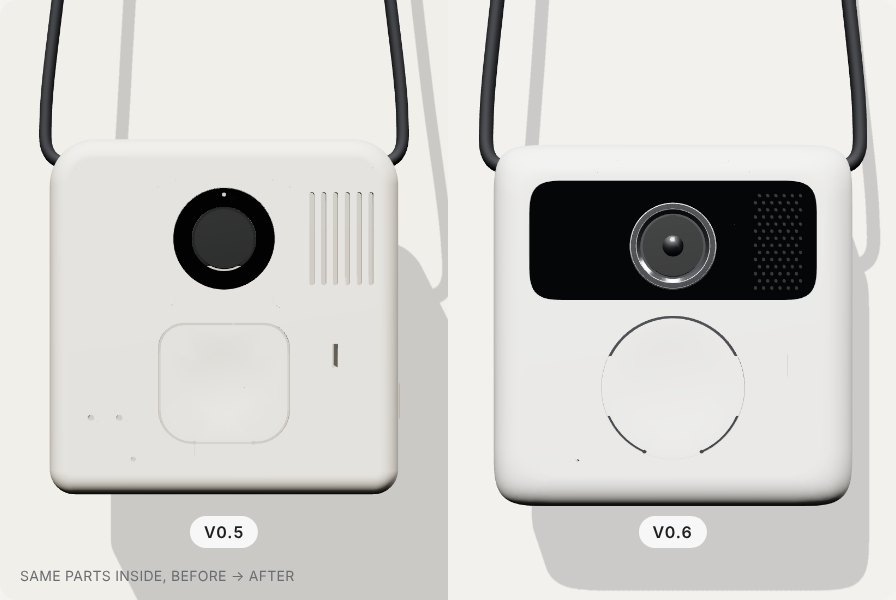
- One piece of glass. A smoked acrylic visor runs across the top. The lens, the speaker and the recording light all sit behind it, so the front reads as one calm surface instead of a lens, a grille and a row of holes.
- Hidden until lit, and impossible to miss when it is. The recording light glows through the glass, and the battery level glows through a 0.45 mm skin in the shell. No light, no holes. This matters more than it looks: the hardest problem with a wearable camera is the people around you, and a light they can clearly see while it is recording is the most basic courtesy the device can offer.
- One button. A round, dished button you can find without looking, on a printed flexure that takes about 2 N to press. Hold to ask, release to hear the answer: the same interaction as in the video.
- Looks thinner than it is. An 8 mm soft front edge and a dark, tapered base make the 26 mm body read closer to 20 mm when it hangs on you.
- Fewer holes. The board’s BOOT and RESET buttons are gone from the face, there is a single microphone pinhole, and the ports sit in clean stadium-shaped pockets.
- A softer shape. Continuous-curvature corners, the same squircle as an app icon, instead of a rounded box.
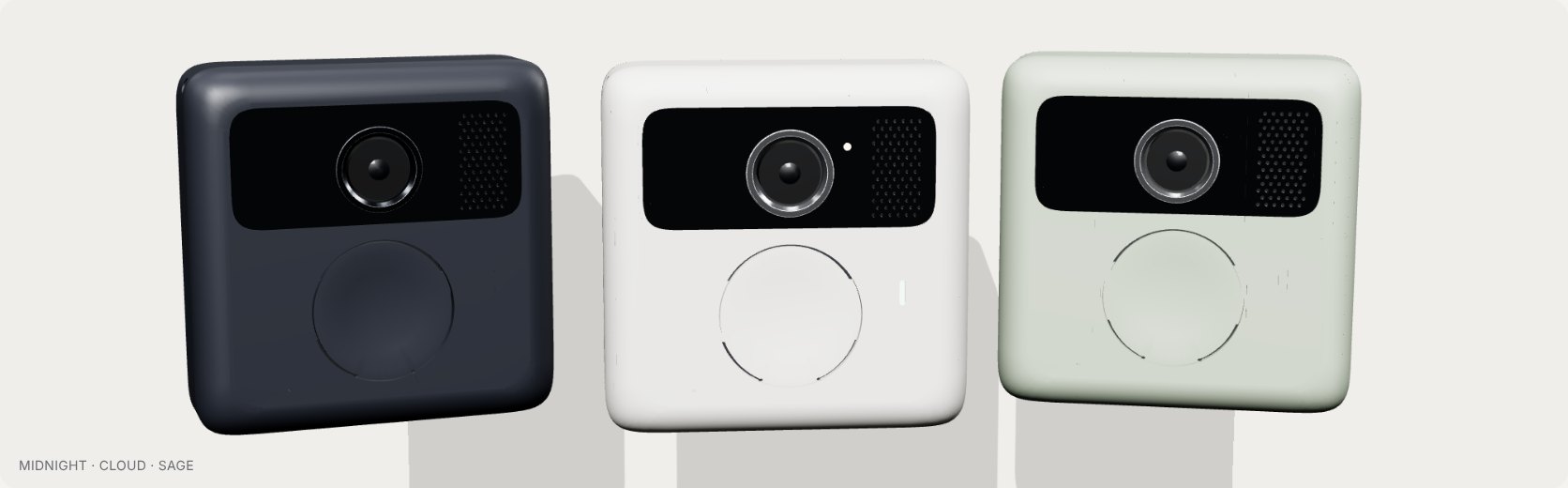
It is designed to be made without a factory. The body is MJF nylon, dyed, or SLA resin with a matte paint; ordinary FDM printing works but shows layer lines. The visor is 2 mm smoked cast acrylic, laser-cut from a DXF. The bezel around the lens is silk-silver resin for now and a CNC-machined aluminium ring later, and the base is printed in black, because that dark band is what makes the whole thing look like it floats.
Getting from the board in the video to this is the work of the next few parts of the series: printing and fitting the enclosure, measuring real battery life, and moving the recording light and privacy controls from a design choice into firmware. The full v0.6 design sheet is here.
The idea: an assistant that was there
Today’s AI assistants know a lot about the world and almost nothing about your day. They can explain quantum field theory but cannot tell you where you put your passport, which slide your colleague showed on Tuesday, or whether the shelf in the garage was already empty last week. Everything they know about your life is what you remember to type in.
LOCI Companion is my attempt to close that gap. It does three things:
- Sees. A small camera at chest height captures what is in front of you, when you want it to.
- Remembers. What it saw is stored with where and when it saw it, so the assistant builds up a memory of your physical world over time instead of starting from zero every conversation.
- Answers. You ask in plain language, by voice, and it answers from that memory. When something has changed in a place you care about, it can tell you.
The everyday version is mundane on purpose: finding things, recalling things, noticing things. Where I parked. What the label on the medicine box said. Who was at the table. The same memory is also powerful for people who need it most: someone who is blind or has low vision, or someone living with memory loss, gets far more from an assistant that remembers than from one that only describes the current moment. I want both to work, and I will test with both.
Why the memory matters more than the camera
The camera is the easy part. The hard part, and the part I care about most, is the memory underneath it. That is LOCI-DB, an open-source spatial memory I have been building for robots, drones and world models. It stores each observation with its position in space and its moment in time, indexes them together on a four-dimensional Hilbert curve, and returns a novelty score that says how different the current view is from anything seen before at that place.
Those two properties are what make it an assistant rather than a camera. Indexing by place and time means a question like “where did I last see my keys” is a lookup, not a search through hours of footage. Novelty means the assistant can stay quiet most of the time and speak up only when something actually changed. An assistant that talks less and says more is the whole product.
A robot and a person wearing a pendant have the same underlying problem: they move through a world, see it from one point of view, and need to remember what they saw. LOCI Companion is the first place I am putting that memory on a human.
How the pieces fit
The pendant is a thin client. It does the things that have to happen on your body: look, listen, speak, and keep working when the network does not. Everything heavy runs on a host I own, which today is a laptop and could as easily be a Raspberry Pi in a cupboard. The two talk HTTPS over one keep-alive connection, either on the home network or through a Cloudflare Tunnel when I am out.
A frame goes up roughly twice a second. The host runs object detection on it, and every detection becomes a memory in LOCI-DB: a label, a position, a time and a confidence. When I hold the button and ask a question, the audio goes up the same pipe, is transcribed locally, answered from the memory, turned into speech and played from the board’s speaker.
The part I am proudest of is the offline path. If the host disappears, the pendant keeps capturing to its microSD card and uploads the backlog later with the original timestamps, so the memory has no holes. It also caches a spoken answer per remembered object, and an on-device speech recogniser (Espressif’s MultiNet7, no wake word, no cloud) can match “where is my cup” and play the cached answer with no host at all.
Inside LOCI-DB
Most AI memory today is a vector database: you turn things into embeddings and find the ones most similar to a question. That covers what. A wearable also needs where and when, and it needs all three in a single query. “Where did I leave my cup” is a similarity question with a place answer. “What was on the table this morning” is a place question with a time window. Bolting coordinates onto a vector store as ordinary filters works for a demo and falls over as the memory grows. LOCI-DB makes space and time part of the index.
A memory is what, where and when
The unit of memory is a WorldState: an embedding vector for what was seen, an x, y, z position, a timestamp in milliseconds, a scene_id that groups observations of the same thing, a confidence and free-form metadata. States in the same scene are linked to the one before them, so the database can replay how something moved over time.
The Hilbert curve: one number for space and time
The core trick is a space-filling curve. A Hilbert curve visits every cell of a grid in a single continuous line, and it has a useful property: cells that are close together in space are mostly close together along the line. LOCI-DB encodes each memory’s (x, y, z, t) onto a four-dimensional Hilbert curve, so every memory gets an integer address. It does this at three resolutions (16, 256 and 4,096 bins per axis) so both coarse and fine questions stay cheap.
A question about a place then becomes a short list of curve addresses to match, an integer filter the storage engine is very good at, instead of a geometric scan over every memory. The bucket list only narrows the search. Exact coordinate, time and confidence ranges are applied in the same filter before the nearest neighbours are picked, and an exact geometric check at the end means nothing just inside the edge of the box is missed.
Memory that ages like memory
A pendant that remembers everything forever is a storage problem and a privacy problem. LOCI-DB keeps two collections: raw memories, and summaries. Time is cut into logical epochs, and as epochs get old their raw states are folded into per-scene summaries and deleted. Recent memory stays sharp, old memory becomes gist, and storage stays bounded however long the device runs. Results are also re-ranked by recency with an exponential decay that halves every hour by default, so the cup you put down five minutes ago beats the one from last week.
Novelty: knowing when to speak
The call I care most about for an assistant is predict_and_retrieve. It takes what you are looking at now, optionally runs it through a world model to predict what comes next, and searches memory for the closest match. Alongside the results it returns a novelty score between 0 and 1: one minus the best similarity, optionally calibrated against the history of scores. Near 0 means “I have seen this here before”. Near 1 means “this is new”. That single number is what lets the assistant stay quiet when nothing has changed and speak up when something has.
Show me the code
LOCI-DB is a Python library, Apache 2.0, and runs in-process with no server, Docker or GPU. This is the pendant’s memory in miniature, and it runs as written:
# pip install loci-stdb
import time, zlib
import numpy as np
from loci import LocalLociClient, WorldState

memory = LocalLociClient(vector_size=128)

def embed(label: str) -> list[float]:
    # Stand-in for a real image or label embedding (CLIP, DINOv2, ...)
    rng = np.random.default_rng(zlib.crc32(label.encode()))
    v = rng.normal(size=128)
    return (v / np.linalg.norm(v)).tolist()

# Every detection from the pendant's camera becomes one memory:
# WHAT it saw (a vector), WHERE (x, y, z in [0, 1]) and WHEN (ms).
now = int(time.time() * 1000)
sightings = [  # label, x, y, z, seconds ago
    ("cup",      0.48, 0.52, 0.40, 3 * 3600),
    ("keys",     0.12, 0.80, 0.55, 1800),
    ("scissors", 0.55, 0.50, 0.40, 600),
]
for label, x, y, z, ago in sightings:
    memory.insert(WorldState(
        x=x, y=y, z=z,
        timestamp_ms=now - ago * 1000,
        vector=embed(label),
        scene_id=f"{label}@kitchen",
        confidence=0.9,
        metadata={"label": label, "room": "kitchen"},
    ))

# "Where did I leave my cup?"  Similarity in, place and time out.
hit = memory.query(vector=embed("cup"), limit=1)[0]
mins = (now - hit.timestamp_ms) // 60_000
where = f"({hit.x:.2f}, {hit.y:.2f}, {hit.z:.2f})"
print(f"{hit.metadata['label']} at {where}, {mins} min ago")
# cup at (0.48, 0.52, 0.40), 180 min ago

# "What was on the table in the last hour?"
# A box in space plus a window in time.
table = {"x_min": 0.4, "x_max": 0.6,
         "y_min": 0.4, "y_max": 0.6,
         "z_min": 0.3, "z_max": 0.5}
recent = memory.query(vector=embed("scissors"),
                      spatial_bounds=table,
                      time_window_ms=(now - 3_600_000, now),
                      limit=5)
print([r.metadata["label"] for r in recent])
# ['scissors']  (the cup is on the table too, but three hours ago)

# "Is this new?"  0.0 = seen it here before, near 1.0 = new.
for label in ["cup", "umbrella"]:
    r = memory.predict_and_retrieve(
        context_vector=embed(label),
        predictor_fn=lambda v: v,        # plug a world model in here
        current_position=(0.48, 0.52, 0.40),
    )
    print(label, round(r.prediction_novelty, 2))
# cup 0.0
# umbrella 0.96
Swap LocalLociClient for LociClient("http://localhost:6333", ...) and the same code runs on a persistent Qdrant backend. In the real system the vector comes from the detector’s label rather than a stand-in, and positions come from where the object sits in the frame or, on the first Raspberry Pi prototype, from real 3D coordinates in metres.
On the board, the firmware is ESP-IDF C. Stripped of logging, its main loop is short:
// The pendant's main loop, simplified from firmware/esp32-p4-client/main/app_main.c
for (;;) {
  if (button_down()) {             // push to talk
    record_and_ask();              // host answers; if it is unreachable,
    continue;                      // MultiNet7 on the board answers from the card
  }
  bool online = host_reachable();

  if (online && local_backlog_count() > 0)
    upload_one_backlog_frame();    // frames captured offline, original timestamps

  if (time_for_next_frame()) {
    if (online) live_frame();      // JPEG to the host, labels (and any audio) back
    else capture_to_card();        // no host: keep remembering to microSD
  }
  vTaskDelay(pdMS_TO_TICKS(5));
}
And because an assistant is increasingly an agent, LOCI-DB also ships an MCP server, so Claude or any MCP client can use the same memory:
pip install "loci-stdb[mcp]"
claude mcp add loci-memory --env LOCI_MCP_MODE=local -- loci-mcp
# tools: remember, recall, novelty, trajectory, memory_stats
Where it started: a Raspberry Pi and a depth camera
The first LOCI Companion was not a pendant. It was a Raspberry Pi 5 in one hand, a Luxonis OAK-D Lite depth camera in the other, and a Bluetooth headset for asking questions. I walked around the house with it while LOCI-DB built up its memory.
It worked, and better than I expected. The OAK-D Lite does a lot of the work on the camera itself: it runs an object detector (YOLOv6-nano) on its own chip and uses its pair of stereo cameras to measure how far away each object is, so every detection arrives with real 3D coordinates in metres, about ten times a second. Printed AprilTags on the doors told the Pi which room it was in and where it was standing, so positions were stored in room coordinates rather than relative to the camera. That made the answers properly useful. A typical one:
“Your mug (I track it as a cup) was last seen in the kitchen, about 1 m into the kitchen and 1 m to your left as you walk in from the door tag, at table height. That was 40 seconds ago.”
It could also answer “what changed in the kitchen?” (“the cup moved about 2 m”), it said honestly when it was asked about something it cannot recognise, like keys, and it remembered across restarts. Everything ran on the Pi: detection, memory, speech recognition and speech synthesis, with no cloud service involved.
It also proved, very clearly, that nobody would wear it. Both hands were full, a USB cable ran between them, the camera could drop out when the power bank sagged, and there was a headset on top of all that. The memory was right. The body was wrong.
What changed when I made it smaller
The fix was to split the system in two. The pendant keeps only what has to be on your body: a camera, a microphone, a speaker, one button and a microSD card. The thinking moves to a host you own. That is why an ESP32-P4 board, a fraction of the size, weight and power draw of the Pi and depth camera, can run the same assistant: it does not have to do the heavy work, only see, listen, speak and never lose a memory.
| First prototype | Pendant | |
|---|---|---|
| On your body | Raspberry Pi 5, OAK-D Lite, headset | One ESP32-P4 board on a cord |
| Object detection | On the camera (YOLOv6-nano) | On the host (YOLOv8n) |
| Positions | 3D in metres, anchored to rooms by AprilTags | Where the object sat in the camera’s view |
| Asking a question | Bluetooth headset | Built-in button, microphone and speaker |
| Without a network | Everything local on the Pi | Keeps recording to microSD; answers common questions on the board |
| Wearable | No: two hands and a cable | Yes |
The trade is depth. The pendant has a single camera, so for now it says “on the right, in the middle area” instead of “1 m into the kitchen”. The memory layer did not change at all: the same LOCI-DB stores both, because a room coordinate and a position in view are both just a place and a time. Bringing room-level answers back to the pendant is one of the next steps, and the Pi rig stays on my shelf as the reference for what good looks like.
Why a pendant
The Pi rig settled what the device should not be. Glasses are the obvious choice and the wrong one for a first version: expensive, hard to fit, and a big ask for someone who does not already wear them. A phone has to be taken out and pointed, which means you only capture what you already knew was important. A pendant on a lanyard sits at chest height, sees roughly what your body is facing, leaves both hands free, and comes off in a second. It is also the cheapest thing to build and iterate on, which matters when you are one person with a soldering iron.
What is on my desk today
The current build is deliberately off the shelf, so anyone can reproduce it:
| Part | What it does |
|---|---|
| Waveshare ESP32-P4-WIFI6 Kit A | The brain. An ESP32-P4 handles the camera and on-device processing; a companion ESP32-C6 provides Wi-Fi 6 and Bluetooth. The kit includes the camera module and a speaker. |
| NULLLAB PM11 battery module, 1200 mAh | Power, so the device can be worn untethered. |
| Lanyard | The mount. Low-tech on purpose. |
| LOCI-DB | The memory: what was seen, where and when, plus novelty detection. |
Where I am right now
There is a working demo, end to end. The board streams frames to the host, I hold the button and ask “where is my cup?”, and the answer plays from the speaker about 1.3 seconds after I let go. On the home network a frame makes the round trip in 70 to 240 ms; through the Cloudflare Tunnel, 200 to 400 ms. With the host switched off, the board recognised “where is my cup” on its own in 730 ms and played the cached answer from the card. The video at the top of this post is that loop, unedited.
The Raspberry Pi and OAK-D Lite rig did its job: it proved the memory works with real 3D positions and room-level answers. It is retired as the main prototype now, and stays as the benchmark the pendant has to catch up with on the “where”.
What I do not have yet is a prototype I would hand to someone else. That is the next milestone.
The hard problems
Four problems decide whether this becomes something people actually wear:
- Privacy. This is the first problem, not the last. A camera on your chest sees other people, and a memory of your day is the most personal dataset you will ever own. My default is that images stay on the device or on hardware you own, that what gets stored is memory rather than video, and that the assistant can be told to forget. This is the same principle behind Enclave, my other project on keeping sensitive data out of reach of the models that use it.
- Power. Continuous vision on a 1200 mAh battery is a budget problem. The device has to choose when to look, not stare all day.
- Latency. An answer that arrives three seconds late is an answer about where you used to be. Deciding what runs on the ESP32-P4 and what runs elsewhere is the central architecture question.
- Trust. If it is confidently wrong once in a way that matters, people stop wearing it. It has to know when it does not know, and say so.
What is next in the series
- Part 2: The hardware. The full parts list, wiring, the enclosure and what I would change.
- Part 3: Giving an assistant a memory. LOCI-DB in depth: storing observations from a moving wearer, the benchmarks, where it is slow, and how novelty decides when to speak.
- Part 4: Privacy and power. What runs on the device, what never leaves it, how forgetting works, and the battery numbers.
- Part 5: First wearers. Putting the prototype on people who are not me, and what they tell me.
If you build wearables, work on personal AI or accessibility, or simply have a strong opinion about whether you would wear one of these, I would like to hear from you. Subscribe below to get each part when it is published.